
Azure Cosmos DB Change Feed Intro
I recently had to do some research into using Azure’s Cosmos DB Change Feed and wanted to share some of what I found. Change Feed is a pretty cool feature within Cosmos that lets you track changes to your document collections. It can be really helpful when trying to trace history or replay a set of changes to your data. In this post, I’ll share some basic background and an example Azure Function I wrote as a change feed processor. If you’d like to see my sample project, check it out at my GitHub repo.
What is Change Feed?
Within Cosmos DB, change feed is a mechanism that listens to any changes in your collections data. By default Change Feed is already turned on. If you want to make use of Change Feed or listen for specific events, you’ll need to utilize something like an Azure Function to implement a Change Feed Processor.
The processor basically just fires off whenever data is changed in a collection and then you can do whatever you want with the data. There is a lot of good documentation on how this works, but there are a few considerations if you want to implement it for your team.
First, Change Feed has 2 modes Latest Version Mode and All versions and deletes mode. The high level of these 2 modes are:
Latest Version Modeonly tracks inserts and updates.All versions and deletes modetracks everything with a metadata field for operation type, but requires that you usecontinuous backupson your collection.
Even though Latest Version Mode only tracks inserts and updates, the recommendations are to use soft flags for updates/creates/deletes. So you could basically just read in something like an operationType attribute of documents in your collection, which could then be interrogated by your Change Processor to understand what happened.
If you wanted to use All versions and deletes mode the cost considerations for continuous backups are the following:
- backup costs = about $0.20 per GB month multiplied by your database size and the number of regions deployed
- restore costs = if you wanted to call the restore APIs within Cosmos DB you will incur one time charges per call of about $0.15 per GB of data restored
- retention costs = there are different costs for retention periods of either 7 or 30 days
Implementing flags to detect updates/creates/deletes is actually pretty simple. In the next section I’ll walk through my sample project and talk about one way you could implement flags. If you’d like to learn more about the modes of change feed, I recommend checking out the docs here.
A Sample Implementation
As I said in the above section, my example project used the Latest Version Mode and so I had to use flags. It helps if you first see the code, and then I can walk you through examples. My Change Processor function listens to changes on one Collection (called Container1) and then writes the changes to a second Collection (called History). Let’s first start with the code (it is written in C#), the core of the function is as follows:
[Function("CosmosDBTrigger")]
[CosmosDBOutput(
    databaseName: "%HistoryDatabaseName%",
    containerName: "%HistoryCollectionName%",
    Connection = "CosmosDBConnection")]
public List<dynamic> Run(
    [CosmosDBTrigger(
        databaseName: "%SourceDatabaseName%",
        containerName: "%SourceCollectionName%",
        Connection = "CosmosDBConnection",
        LeaseContainerName = "leases",
        CreateLeaseContainerIfNotExists = true)]
    IReadOnlyList<JsonElement> documents)
{
    var outputDocuments = new List<dynamic>();

    if (documents != null && documents.Count > 0)
    {
        _logger.LogInformation($"Processing {documents.Count} document(s) from change feed");

        foreach (var document in documents)
        {
            try
            {
                // Extract the id from the JsonElement
                string documentId = "";
                if (document.TryGetProperty("id", out var idElement) && idElement.ValueKind != JsonValueKind.Null)
                {
                    documentId = idElement.GetString() ?? Guid.NewGuid().ToString();
                }
                else
                {
                    documentId = Guid.NewGuid().ToString();
                    _logger.LogWarning("Document didn't contain an id property, generated a new one");
                }

                // Detect operation type
                string operationType = "";
                if (document.TryGetProperty("operationType", out var oTypeElement) && oTypeElement.ValueKind != JsonValueKind.Null)
                {
                    operationType = oTypeElement.GetString() ?? "unknown";
                }

                // Create history document
                var historyDocument = new
                {
                    id = Guid.NewGuid().ToString(),
                    sourceId = documentId,
                    sourceDocumentData = document.ToString(),
                    changeTimestamp = DateTime.UtcNow,
                    operationType = operationType
                };

                // Add to output collection
                outputDocuments.Add(historyDocument);

                _logger.LogInformation($"Added history record for document with ID: {documentId}");
            }
            catch (Exception ex)
            {
                _logger.LogError($"Error processing document: {ex.Message}");
            }
        }
    }

    return outputDocuments;
}
From the top down you can first see that the Function is annotated with CosmosDBTrigger to indicate that it is acting as a Change Processor. the Function itself receives a list of documents that is the body of changes that are listened to. Then it interrogates the documents object to retrieve the ID and operation type:
// Extract the id from the JsonElement
string documentId = "";
if (document.TryGetProperty("id", out var idElement) && idElement.ValueKind != JsonValueKind.Null)
{
    documentId = idElement.GetString() ?? Guid.NewGuid().ToString();
}
else
{
    documentId = Guid.NewGuid().ToString();
    _logger.LogWarning("Document didn't contain an id property, generated a new one");
}

// Detect operation type
string operationType = "";
if (document.TryGetProperty("operationType", out var oTypeElement) && oTypeElement.ValueKind != JsonValueKind.Null)
{
    operationType = oTypeElement.GetString() ?? "unknown";
}
It then builds a history document with the operation type and writes it to the History collection:
// Create history document
var historyDocument = new
{
    id = Guid.NewGuid().ToString(),
    sourceId = documentId,
    sourceDocumentData = document.ToString(),
    changeTimestamp = DateTime.UtcNow,
    operationType = operationType
};

// Add to output collection
outputDocuments.Add(historyDocument);
The key point to see here is that the operationType field indicates what is happening. When testing my example code I just used the three following values:
- create
- update
- delete
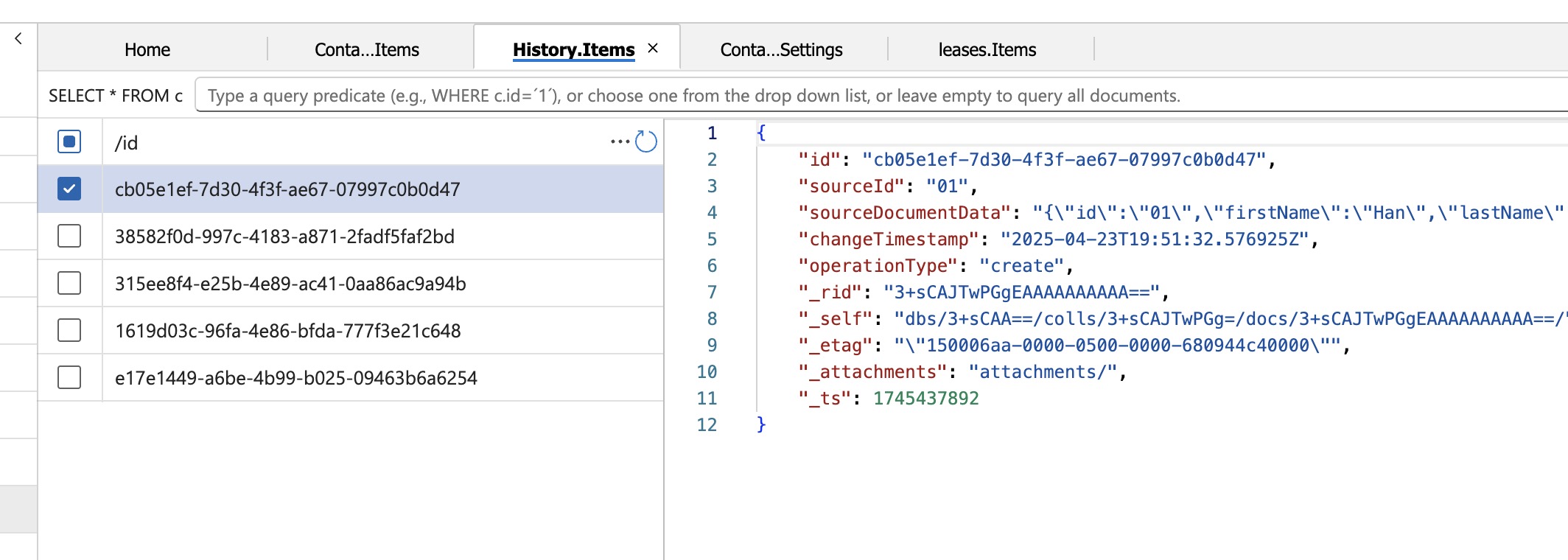
When records are saved to the History collection, the data has consists of an Id, the actual data, and the operation type like this example:
{
  "sourceId": "01",
  "sourceDocumentData": "{\"id\":\"01\",\"firstName\":\"Han\",\"lastName\":\"Solo\",\"operationType\":\"create\",\"_rid\":\"3+sCAJ6-asEEAAAAAAAAAA==\",\"_self\":\"dbs/3+sCAA==/colls/3+sCAJ6-asE=/docs/3+sCAJ6-asEEAAAAAAAAAA==/\",\"_etag\":\"\\\"0200bbf7-0000-0500-0000-680944c00000\\\"\",\"_attachments\":\"attachments/\",\"_ts\":1745437888,\"_lsn\":7}",
  "changeTimestamp": "2025-04-23T19:51:32.576925Z",
  "operationType": "create"
}
Knowing how the data is structured we can then go through exercises of creating/updating/deleting values.
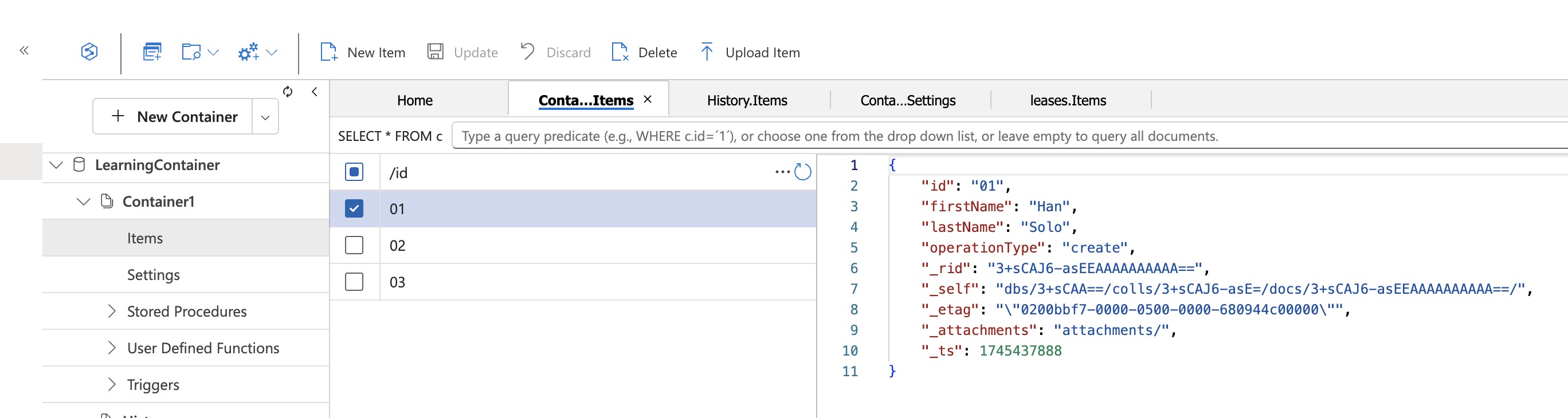
I first start with creating a record, so I created this record in the source collection:
Now in the change feed history table, this is saved as a “create” like so:
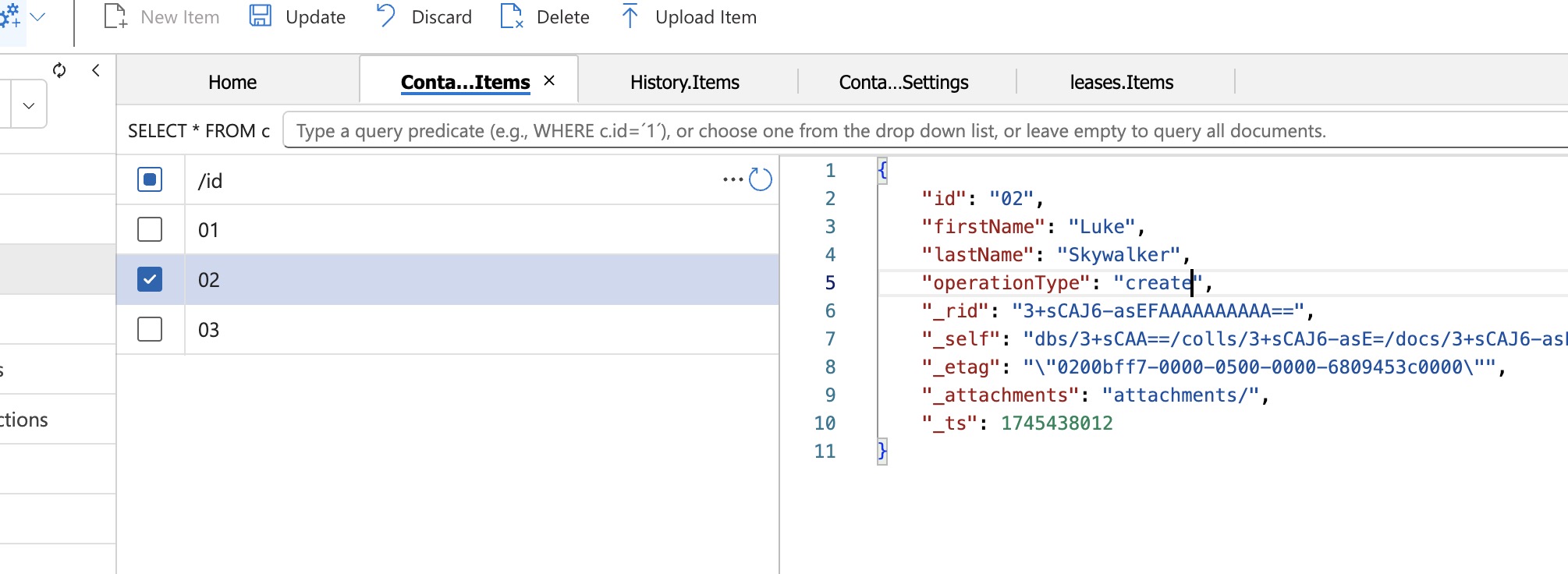
Then I went ahead and created a Luke Skywalker record:
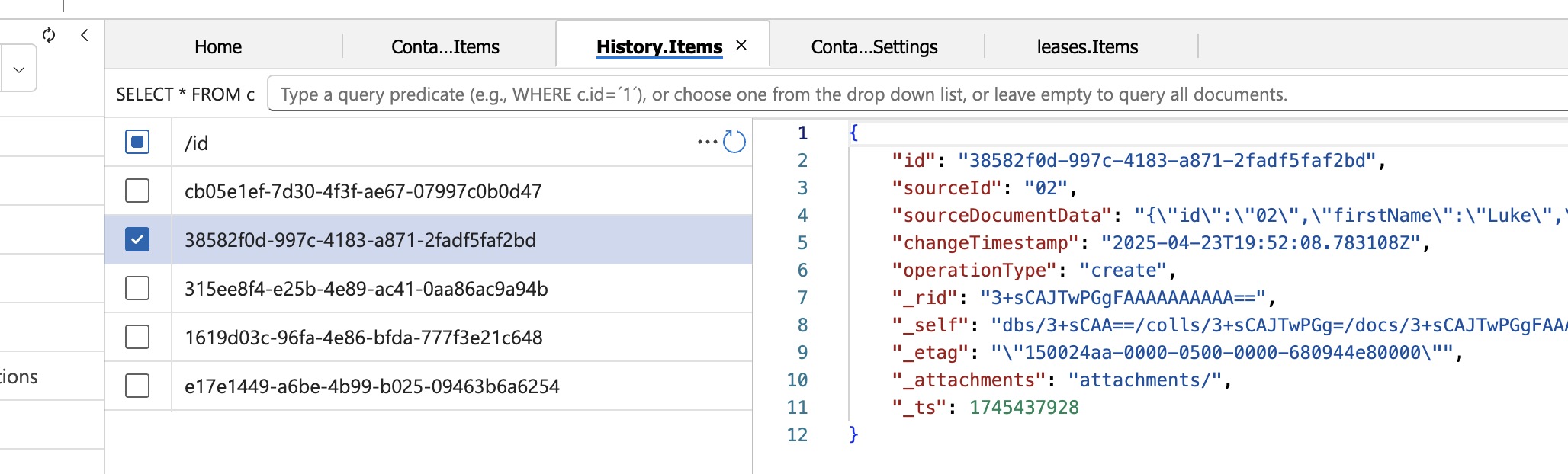
Creating that, I see it a history record was found by the Change Processor as “create” like so:
However, now lets change Luke to Leia but modify the operationType to be update and we now have a new history record:
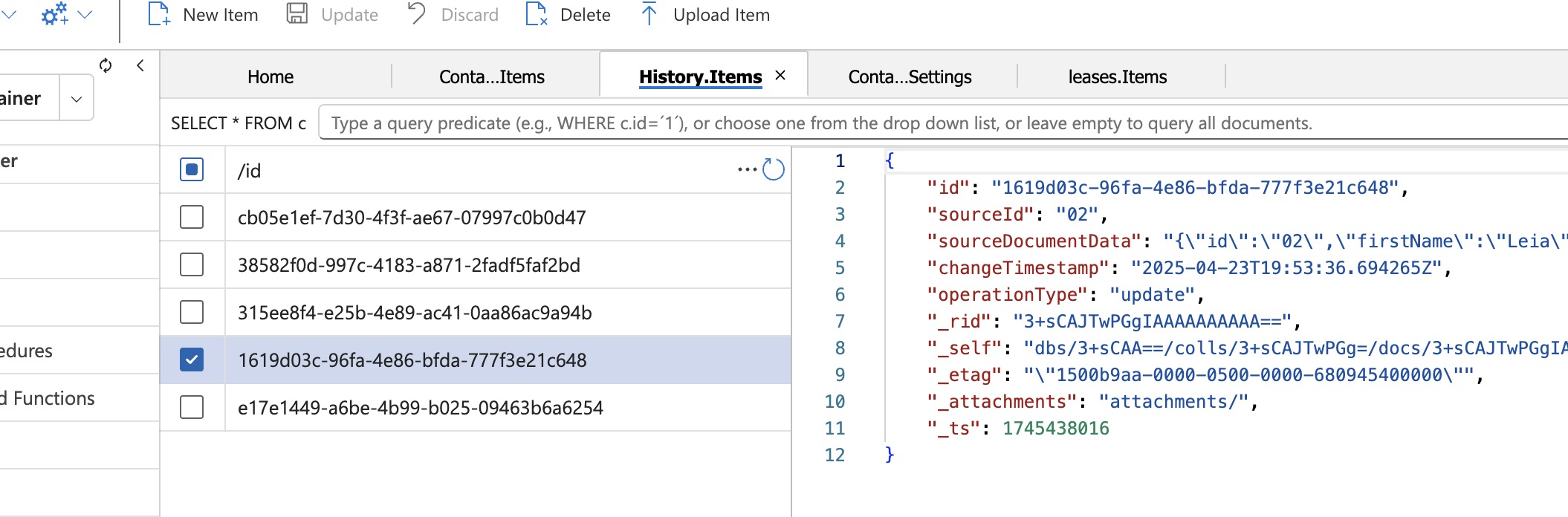
Similarly, I went through the exercise of adding a Darth Vader and then deleting him and seeing the change record saved:
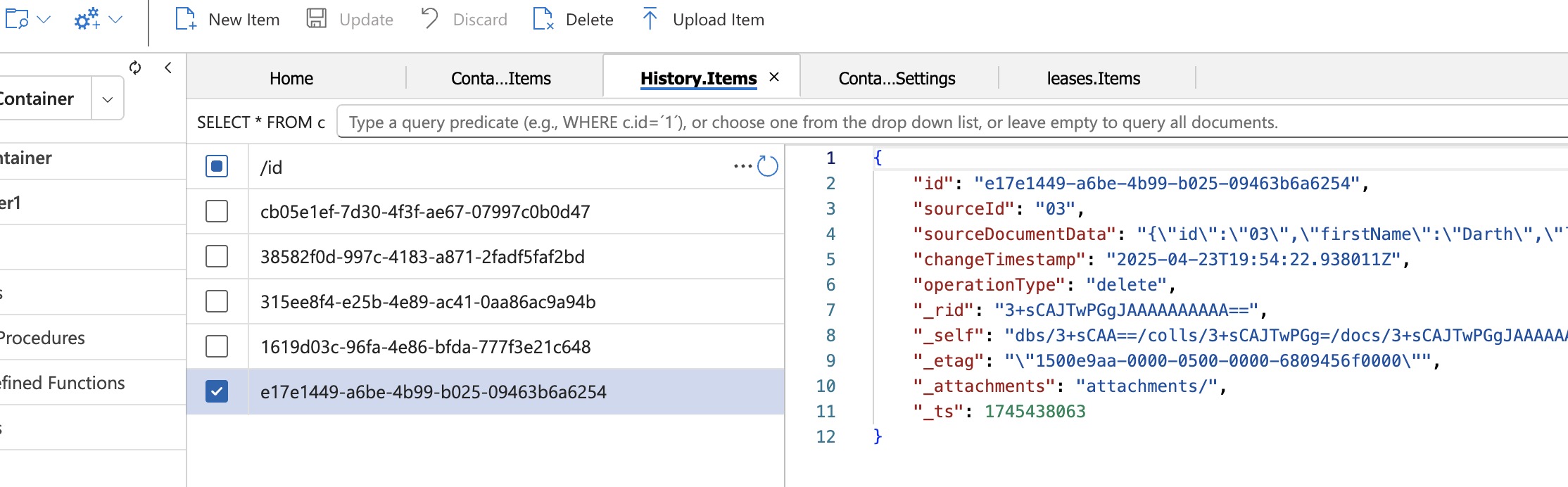
The important takeaway from all of this is just that we are persisting the changes with flags. So it is up to the implementation to actually track the changes vs. something that holds versions of the same data. In practice this is not that difficult, but could get out of hand if not implemented well.
Wrapping Up
I know this post was fairly short, but I just wanted to share an example of Azure Cosmos DB Change Feed. It is definitely a feature of Cosmos DB that can bring a lot of value if your team needs to track changes in your data. I recommend checking out the documentation and my sample project to learn more. Thanks for reading my post!